Hugging Face Models
Hugging Face models are models that can be loaded via the Hugging Face Transformers Python library. These models should be registered with the Huggingface Inference Toolkit engine.
For Hugging Face models, "singular weights" refers to having a single weights file (named either pytorch_model.bin or model.safetensors) while "sharded weights" refers to having multiple weights files. If you are uploading sharded weights (typically only done for very large models such as LLMs),
then be sure they follow the standardized format. If they are .bin files, then they should all be named like
pytorch_model-{number}-of-{total}.bin, and there should be a pytorch_model.bin.index.json file. If they are .safetensors files, then they should all be named like model-{number}-of-{total}.safetensors, and there should be a model.safetensors.index.json file as well. Virtually all models on the Hugging Face Hub follow this format.
Importing From Hugging Face
Chariot provides two methods for importing Hugging Face models:
Direct Import From Hugging Face Hub
The easiest way to import a model is to use Chariot's direct import feature.
- UI
- SDK
- Navigate to the Models page in your project.
- Click Upload.
- Select Hugging Face as the type of model to be uploaded.
- Choose Import from Hugging Face Hub as the upload method.
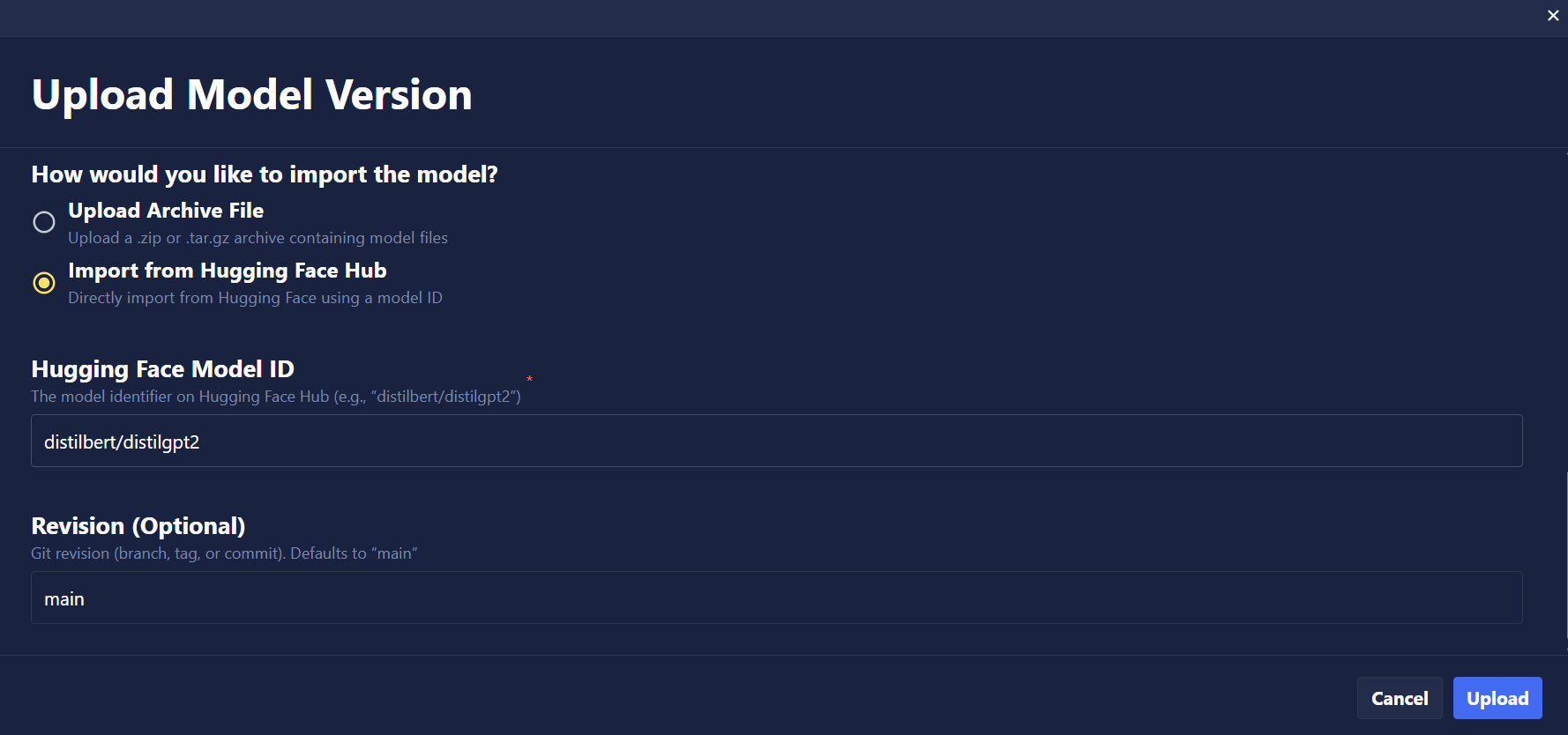
- Enter the Hugging Face model ID (e.g.,
mistralai/Ministral-3-8B-Instruct-2512). - Optionally specify a revision/branch (defaults to
main). - Complete any required remaining fields and click Upload.
The UI currently imports all files from the model repository. To selectively import files and reduce storage usage, use the SDK or API with file filtering patterns (see SDK tab).
Basic Import
from chariot.client import connect
from chariot.models import import_model, ArtifactType, TaskType

connect()

model = import_model(
    project_id="<PROJECT ID>",
    name="hf-internal-testing/tiny-random-BertForSequenceClassification",
    summary="Direct import example",
    version="1.0.0",
    task_type=TaskType.TEXT_CLASSIFICATION,
    artifact_type=ArtifactType.HUGGINGFACE,
    huggingface_model_id="hf-internal-testing/tiny-random-BertForSequenceClassification",
    huggingface_revision="main",
)
Filtering Files During Import
Many Hugging Face repositories contain multiple weight formats (PyTorch, TensorFlow, ONNX, SafeTensors). You can use huggingface_allow_patterns and huggingface_ignore_patterns to selectively import files, reducing storage usage and import time. Just like Hugging Face's filtering, the patterns are Standard Wildcards and documentation can be found here.
Example: Import only PyTorch weights
model = import_model(
    project_id="<PROJECT ID>",
    name="hf-internal-testing/tiny-random-BertForSequenceClassification",
    summary="Import only pytorch weights",
    version="1.0.0",
    task_type=TaskType.TEXT_CLASSIFICATION,
    artifact_type=ArtifactType.HUGGINGFACE,
    huggingface_model_id="hf-internal-testing/tiny-random-BertForSequenceClassification",
    huggingface_revision="main",
    huggingface_allow_patterns=["*.bin", "*.json", "*.txt"],
    huggingface_ignore_patterns=["onnx/*", "*.h5"],  # Exclude ONNX and TensorFlow
)
Download to Local Machine and Upload to Chariot
If you prefer, you can manually download the model from Hugging Face and upload it to Chariot. This method is useful when you need to modify the model files before uploading, work in an offline environment, or select specific files to upload (avoiding the limitation mentioned in the note above).
You may be able to delete a lot of redundant weights in the Hugging Face Hub repo because they are often published in multiple formats. The best weights to use are the .safetensors weights, as they are secure. To save space, you can delete all weights that aren't safetensors, but be sure to keep the model.safetensors.index.json file.
- SDK
# Install the huggingface-hub package if you haven't already
! pip install huggingface-hub

# Download a model from Hugging Face
from huggingface_hub import snapshot_download

# Replace 'microsoft/DialoGPT-medium' with the model you want to download
model_name = "microsoft/DialoGPT-medium"
snapshot_download(repo_id=model_name, local_dir=f"./{model_name}")

# Compress the model folder
import os
os.system(f"tar -czf {model_name}.tar.gz {model_name}")

# Upload to Chariot
from chariot.client import connect
from chariot.models import import_model, ArtifactType, TaskType

# Optionally turn on debug logging to see progress of upload
import logging
logging.basicConfig(level=logging.DEBUG)

connect()

model = import_model(
    project_id="<PROJECT ID>",
    name=model_name,
    version="1.0.0",
    summary="Model imported from Hugging Face",
    task_type=TaskType.CONVERSATIONAL,
    artifact_type=ArtifactType.HUGGINGFACE,
    model_path=f"./{model_name}.tar.gz"
)
Custom Handler for Hugging Face Inference Toolkit
The Hugging Face Inference Toolkit Inference Engine attempts to automatically create a way to handle the inference from the uploaded model files. There are some occasions when the pipeline logic fails to handle specific cases. When this happens, you will need to create a custom handler that will be used to manually create the pipeline and handle the input/inference/output for the model.
| Error / Behavior | Cause | Fix in handler.py |
|---|---|---|
AttributeError: 'str' has no attribute... | Toolkit passing path of the model files instead of object | AutoTokenizer.from_pretrained(path) |
ValueError: Unrecognized model | Custom architecture requires remote code | ENV TRUST_REMOTE_CODE=True |
| CUDA OOM or Single GPU usage | Inefficient loading | Set the pipeline options to auto map GPU device device_map="auto", torch_dtype=torch.bfloat16 |
| Garbage output / Special tokens | This model might be expecting a specific chat format for input/output | Be sure to apply the chat template tokenizer.apply_chat_template(...) |
| Model repeats the user prompt | Default decoding returns full sequence | Slice the generated_ids before decoding |
If you encounter the issues above, create a handler.py file in the root directory of the model files and upload it using the SDK. The following is an example handler.py
from typing import Dict, List, Any, Union
from pathlib import Path
import torch
from transformers import AutoModelForCausalLM, AutoTokenizer
from huggingface_inference_toolkit.const import HF_TRUST_REMOTE_CODE

class EndpointHandler:
    def __init__(self, model_dir: Union[str, Path], task: Union[str, None] = None):
        # Load the tokenizer
        # --- Fix for AttributeError: 'str' has no attribute... ---
        # Explicitly load the tokenizer from the model directory instead of letting the toolkit do it.
        # --- Fix for `ValueError: Unrecognized model` ---
        # Custom architectures require remote code to be enabled.
        self.tokenizer = AutoTokenizer.from_pretrained(model_dir, trust_remote_code=HF_TRUST_REMOTE_CODE)

        # Load the model
        # --- Fix for CUDA OOM or Single GPU usage ---
        # Set the device map to auto map the GPU device and use bfloat16 to save memory/speed.
        # attn_implementation="flash_attention_2": Optional speedup (requires Ampere+ GPUs)
        self.model = AutoModelForCausalLM.from_pretrained(
            model_dir,
            device_map="auto",
            torch_dtype=torch.bfloat16,
            trust_remote_code=HF_TRUST_REMOTE_CODE,
            attn_implementation="flash_attention_2"
        )
        self.model.eval()

    def __call__(self, data: Dict[str, Any]) -> List[Dict[str, Any]]:
        """
        Args:
            data (:obj:):
                Includes the input data and the parameters for the inference.
        """
        # Get inputs
        inputs = data.pop("inputs", data)
        parameters = data.pop("parameters", {})

        # Preprocess
        # --- Fix for Garbage output / Special tokens ---
        # IF the model is expecting a chat format, apply the chat template
        if isinstance(inputs, list) and isinstance(inputs[0], dict):
            # This applies the chat template specific to the model (e.g., <|user|>...)
            # tokenize=False gives the raw formatted string first
            text_input = self.tokenizer.apply_chat_template(
                inputs, tokenize=False, add_generation_prompt=True
            )
        else:
            # Fallback for raw text input
            text_input = inputs

        # Tokenize and move to the appropriate device
        input_ids = self.tokenizer(text_input, return_tensors="pt").to(self.model.device)

        # Run Inference
        with torch.no_grad():
            generated_ids = self.model.generate(
                **input_ids,
                max_new_tokens=parameters.get("max_new_tokens", 1024),
                temperature=parameters.get("temperature", 0.2), # Lower temp is better for code
                do_sample=parameters.get("do_sample", True),
                top_p=parameters.get("top_p", 0.95),
            )

        # Postprocess
        # --- Fix for Model repeats the user prompt ---
        # Decode only the new tokens to avoid repeating the user prompt
        # `input_length` is the length of the user prompt in the input tokens
        input_length = input_ids["input_ids"].shape[1]

        # We slice the generated_ids to keep only the new tokens generated by the model
        new_tokens = generated_ids[0][input_length:]

        # Decode the new tokens and skip special tokens
        generated_text = self.tokenizer.decode(new_tokens, skip_special_tokens=True)

        return [{"generated_text": generated_text}]
You must set the HF_TRUST_REMOTE_CODE environment variable when you create the Inference Server. There is an option in the UI to add specific environment variable values.
Large Language Models (LLMs)
Hugging Face hosts many large language models that require special considerations for uploading and serving. For detailed guidance on working with LLMs:
- Uploading LLMs: Requirements, optimization tips, and step-by-step instructions for uploading LLMs to Chariot
- Inference Servers: Serving LLMs with vLLM and Hugging Face Pipelines, including quantization and inference parameters