Registering a Training Checkpoint
- UI
- SDK
To export a checkpoint into the Model Catalog, navigate to the Metrics tab of the details page for the run, and then click on the Catalog Checkpoint icon in the Checkpoints table.
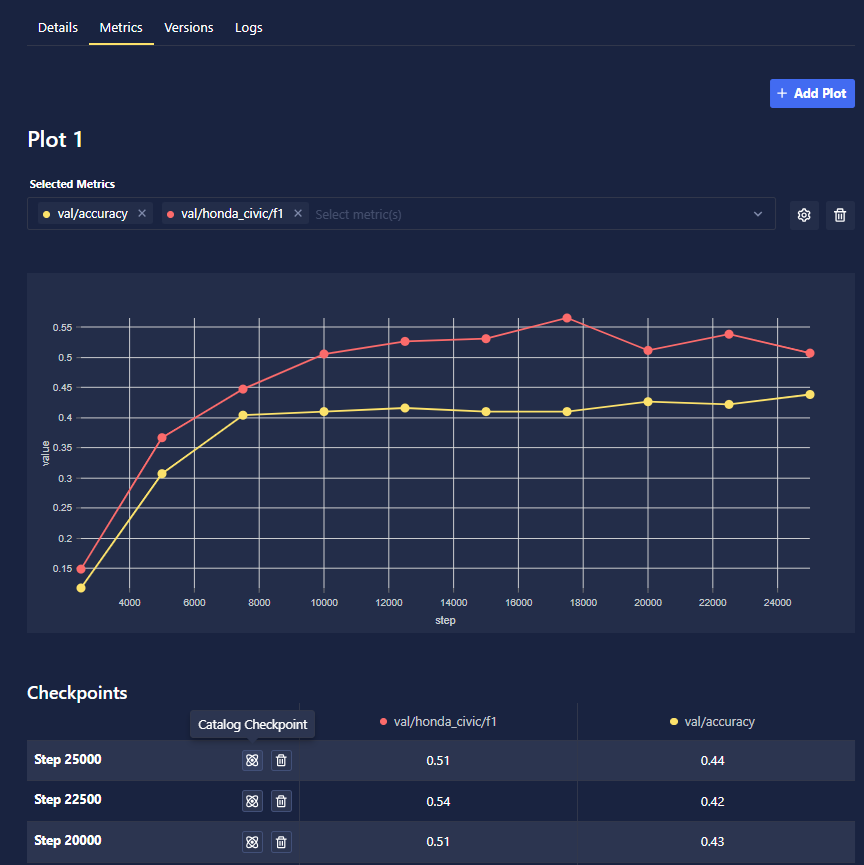
First, choose a checkpoint from an existing Training Run:
from chariot.training_v2 import get_checkpoints, get_runs
from chariot.client import connect

connect()

# If you don't have a run_id yet, get the desired run:
runs = get_runs(
    # uses an SQL ILIKE pattern, using a string with
    # no special characters is equivalent to exact match
    name_ilikes=["<ILIKE PATTERN THAT MATCHES NAME OF RUN>"],
    versions=["1"],
    project_ids=["<PROJECT ID>"],
)

run_id = runs[0]

checkpoint = get_checkpoints(
    run_ids=[run_id],
    global_steps=[<CHECKPOINT STEP NUMBER>],
)[0]
A checkpoint can be cataloged with the create_model_from_checkpoint function:
from chariot.training_v2 import create_model_from_checkpoint

model_id = create_model_from_checkpoint(
    checkpoint_id=checkpoint.id,
    name="<MODEL NAME>",
    version="<MODEL VERSION>",
    summary="<MODEL SUMMARY>",
    tags={"KEY": "VALUE"}, # optional
    project_id="<PROJECT ID IF DIFFERENT FROM RUN'S PROJECT>", # optional
)