Inference Engines
Chariot supports defining Inference Engines for serving models. Chariot ships with various Inference Engines, such as a vLLM Inference Engine for serving popular LLMs; however, you can also define your own Inference Engine. At the most basic level, an Inference Engine consists of:
- An OCI container image
- A name
- A version
- A set of configuration parameters
Chariot can use this Inference Engine information to run the Inference Engine as a service, configured with a specific model.
Creating and using Inference Engines requires code and some developer knowledge. The Inference Engine writer will also need to be able to publish the container image to a registry that is accessible by the cluster where the Inference Engine is used.
Two very important configuration parameters for an engine are env and predictor_env_schema. The first defines a list of key-value environment variables that will be set on every instance of the engine. These are used to tell the underlying image which specific settings are associated with this engine. The predictor environment variable schema is used to validate environment settings for a particular model. The schema is defined by the engine, and the values are set on the model. If the enforce_predictor_env_schema flag is set on an engine, only the environment variables in the schema are allowed. If it is not set or it is set to false, then the schema is validated for types and variable requirement, but additional environment variables may be defined by the model.
Neither the Env settings nor the Predictor Env Schema settings should use the reserved CHARIOT_ as a prefix for variable names. At runtime, several standard environment variables will be set with the CHARIOT_ prefix; the environment settings from the engine will be applied, as will any environment variables defined on the model's Inference Server settings. All of the variable names must be unique to avoid conflicts.
Browsing and Managing Inference Engines
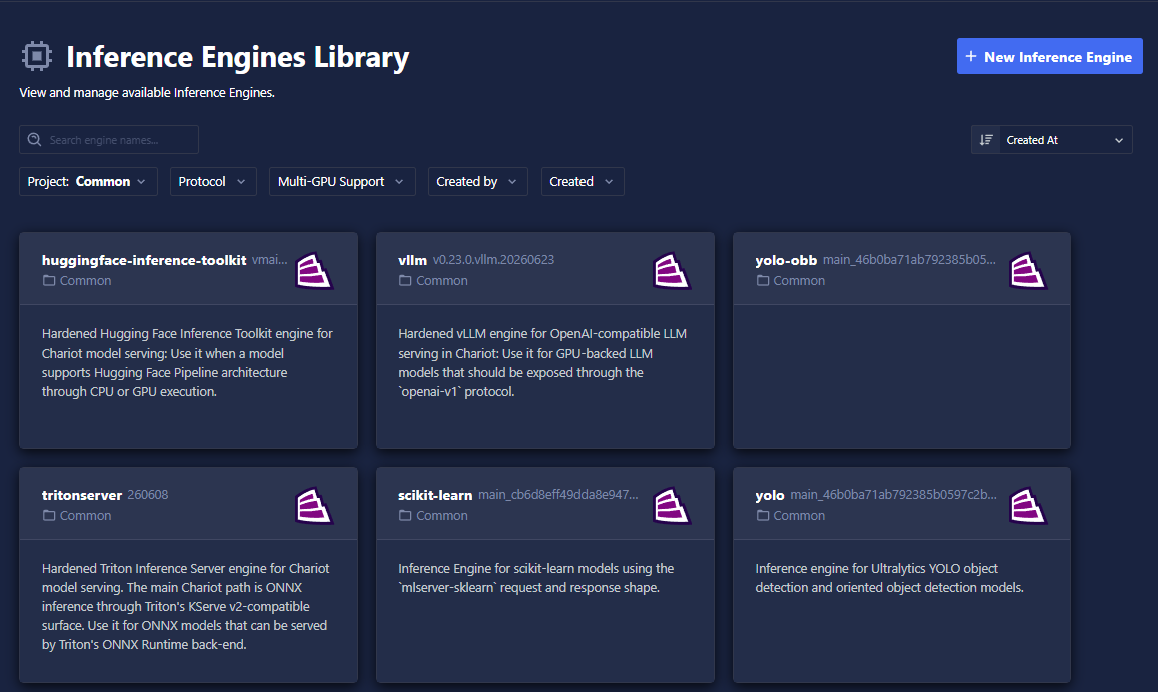
The Inference Engine Library lets you browse all available Inference Engines, inspect their configuration, and register new ones.
- UI
- SDK
Click the Inference Engine Library button on the Models page to open the library.
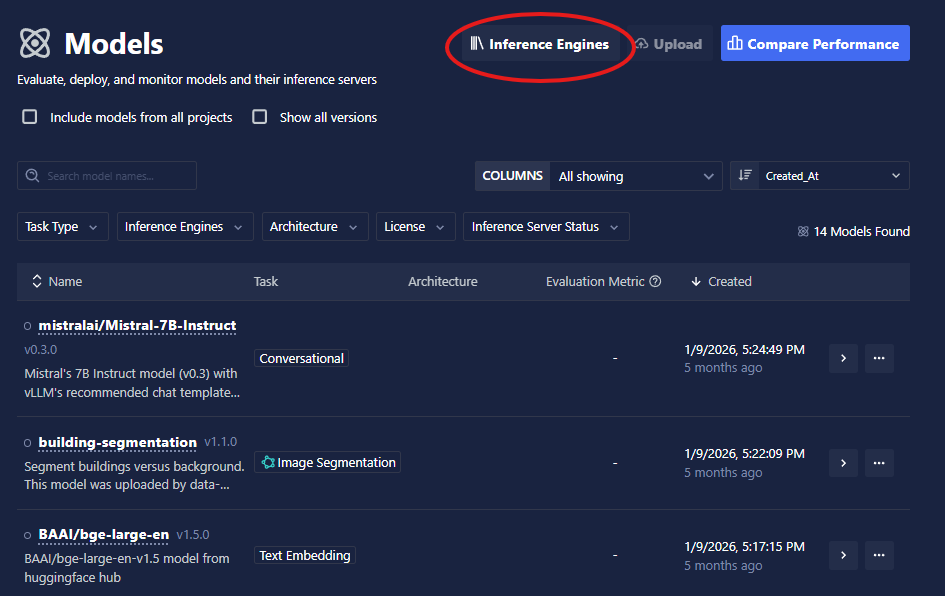
The library shows all Inference Engines available to you. You can browse existing engines or click Create New Engine to register a new one.
Use get_engine_versions to list Inference Engines, optionally filtering by project, engine name, or other criteria:
from chariot.client import connect
from chariot.models.engines import get_engine_versions

connect()

engine_versions = get_engine_versions(
    project_ids=["<PROJECT ID>"],  # optional
)
for ev in engine_versions:
    print(ev.name, ev.version, ev.engine_version_id)
Use get_engine_version_by_selector to look up a specific engine by organization, project, and engine name:
from chariot.models.engines import get_engine_version_by_selector

engine_version = get_engine_version_by_selector(
    org_name="<ORG NAME>",
    project_name="<PROJECT NAME>",
    engine_name="<ENGINE NAME>",
    # version="1.0.0",  # optional; omit to get the default version
)
Viewing an Inference Engine
Select an engine from the library to inspect it.
Overview
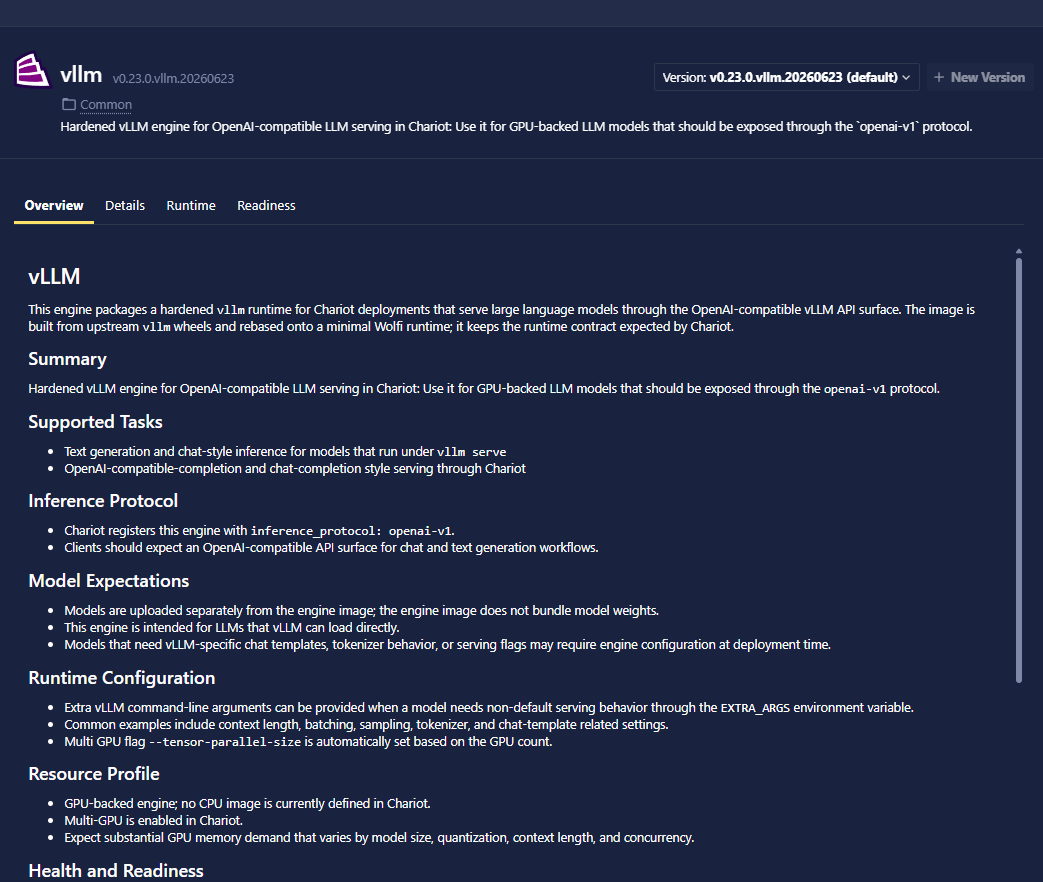
The Overview tab displays the engine's documentation as rendered Markdown, giving you a description of what the engine does, what models it supports, and any usage notes provided by the engine author.
Details
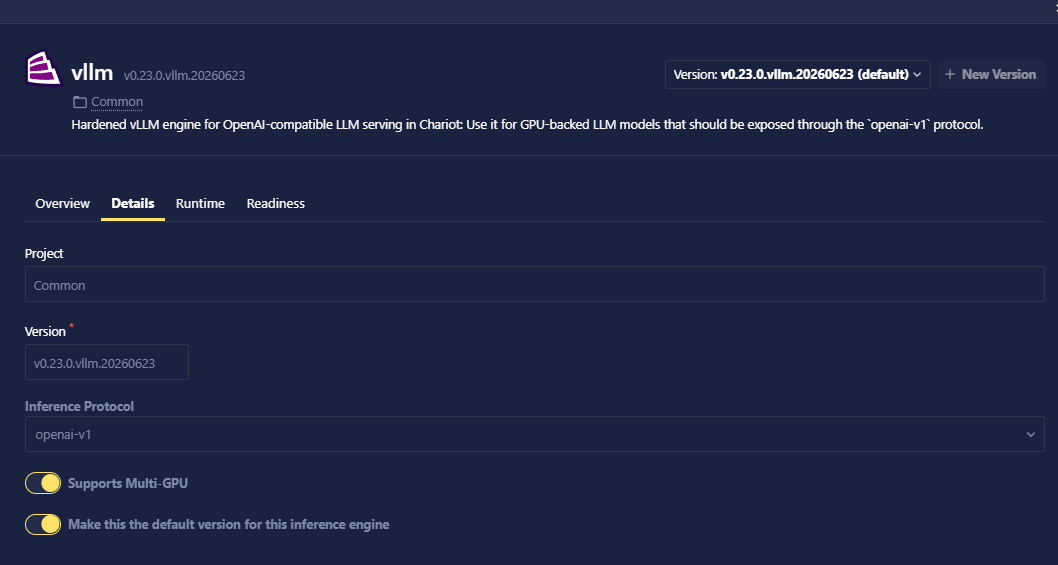
The Details tab shows the engine's technical configuration: which inference protocol it declares (if any), whether it supports multi-GPU serving, the container images registered for CPU and GPU, and other metadata.
Runtime
The Runtime tab lists all the configuration parameters the engine exposes via its predictor_env_schema. These are the environment variables users can set per-model when creating an Inference Server. Each parameter shows its name, type, whether it is required, and its default value (if any).
The Runtime tab shows the schema the engine defines. The actual values for a specific model are set in that model's Inference Server settings when creating an Inference Server.
Adding a New Engine Version
You can register a new version of an existing engine from the library or via the SDK. Chariot groups engine versions by name and project, so publishing a new version does not affect models already using a previous version.
- UI
- SDK
- Open the Inference Engine Library and select an existing engine.
- Click Create New Version.
- Enter the new version string, container image URIs, and any configuration parameters.
- Click Submit.
Call create_engine_version with the same name and project_id as an existing engine but a new version string:
from chariot.client import connect
from chariot.models import engines

connect()

engine_version_id = engines.create_engine_version(
    name="<ENGINE NAME>",       # same name as the existing engine
    project_id="<PROJECT ID>",  # same project as the existing engine
    version="2.0.0",            # new version string
    container_image_cpu="docker.io/my-engine-image-cpu:v2",
    container_image_gpu="docker.io/my-engine-image-gpu:v2",
    is_default=True,            # promote this version to the default
    readiness_probe=engines.ReadinessProbe(
        path="/ready",
        port=8080,
        initial_delay_seconds=5,
        timeout_seconds=10,
        period_seconds=1,
        success_threshold=1,
        failure_threshold=3,
    ),
)
To update an existing version's summary or README (which appears in the Overview tab), use patch_engine_version:
engines.patch_engine_version(
    engine_version_id=engine_version_id,
    summary="Short description shown in the library listing",
    readme="# My Engine\n\nLong-form Markdown documentation shown in the Overview tab.",
)
Creating an Inference Engine
At its core, an Inference Engine is an OCI image that has been uploaded to a container registry and registered with Chariot. When a model's Inference Server settings point to the Inference Engine, that image will be used when starting an Inference Server for the model. Since Inference Engines can contain custom code, they can be used to support many different types of models.
To interoperate with Chariot, Inference Engines must expose a small set of well-known endpoints and can, optionally, implement a recognized inference protocol. At a minimum, your container must implement a GET health endpoint so Chariot can determine if the model is ready to service requests. To enable advanced features (Inference Store, drift detection, evaluation, and SDK compatibility), you should implement and declare a supported inference protocol—we recommend chariot-v2-kserve.
Parts of the Inference Engine
An Inference Engine is an OCI image that runs an HTTP server. The code itself can be written in the language of your choice. This server must be written to process inference requests for your target models, and the image must be stored in a Chariot-accessible container registry.
For example, to write an Inference Engine that serves Hugging Face models, you might use Python with FastAPI and the transformers library, and then build and push the image with podman.
Server
The HTTP server must implement:
- Health check: A
GETendpoint that returns HTTP 200 when the model is ready to service requests. This is configured via thereadiness_probefield when creating an Inference Engine. See the example below. - Inference endpoint: A
POSTendpoint that accepts inference requests.
You control the request path prefix via the container_root_relative_base_url setting when registering the Inference Engine. This value is prepended to the endpoints above. For example:
- Simple base:
/or empty → endpoints are/readyand/infer. - Model-specific base:
/v2/models/m-<lower-case-model-id>→ endpoints are/v2/models/m-<lc-modelid>/readyand/v2/models/m-<lc-modelid>/infer.
Choose the pattern that matches your Inference Engine architecture; model-specific prefixes are useful when a single Inference Engine instance serves multiple models or versions.
For example, with a FastAPI server, this might look like:
from fastapi import FastAPI, Response, Request, JSONResponse
from http import HTTPStatus
import asyncio
from contextlib import asynccontextmanager


class ModelAPI:
    def __init__(self):
        self.model = None
        self._ready = False

    def _load_sync(self):
        """
        Load your model (synchronous)
        """
        # Your model loading logic here
        self.model = "model_instance"
        self._ready = True

    async def load(self):
        """
        Load model asynchronously
        """
        await asyncio.to_thread(self._load_sync)

    def _infer_sync(self, body: dict):
        """
        Infer on your model (synchronous)
        """
        assert self.model is not None
        # Your inference logic here
        return {"result": "inference_output"}

    async def infer(self, request: Request) -> JSONResponse:
        """
        Handle inference endpoint
        """
        post_body = await request.json()
        # Perform model inference using asyncio
        result = await asyncio.to_thread(self._infer_sync, post_body)
        return JSONResponse(content=result)

    async def ready(self) -> Response:
        """
        Handle ready endpoint
        """
        return Response(status_code=HTTPStatus.OK if self._ready else HTTPStatus.BAD_REQUEST)


def main():
    import uvicorn

    api = ModelAPI()

    @asynccontextmanager
    async def lifespan(app: FastAPI):
        # Load model on startup
        await api.load()
        yield

    app = FastAPI(lifespan=lifespan)

    # Add routes
    app.add_api_route("/ready", api.ready, methods=["GET"])
    app.add_api_route("/infer", api.infer, methods=["POST"])

    uvicorn.run(app, host="0.0.0.0", port=8080)


if __name__ == "__main__":
    main()
Be sure to bind to host="0.0.0.0". If you instead bind to default host="127.0.0.1", the Kubernetes readiness probe will fail with an error similar to the following:
Readiness probe failed: Get "http://10.30.66.14:8080/engine-test/ready": dial tcp 127.0.0.1:8080: connect: connection refused
The readiness probe endpoint will be used to determine if the model is ready to process inference requests or not and should return a 200 response if it is. The infer endpoint does the actual inference for the model. Your model artifact (what you uploaded to Chariot) will be unzipped and copied to /mnt/models within your container.
Chariot also injects a small set of standard environment variables into the Inference Engine container. These names are reserved and always use the CHARIOT_ prefix:
CHARIOT_MODEL_ID: The model ID for the model being served.CHARIOT_TASK_TYPE: The Chariot task type for that model, such asObject Detection.CHARIOT_INFERENCE_PROTOCOL: The inference protocol declared on the Inference Engine version. If no protocol was declared, then this value is an empty string.
Use these variables when your server needs request routing, model-specific initialization, or protocol-aware behavior. User-supplied environment variables may not begin with CHARIOT; that prefix is reserved for Chariot-managed values.
Any logs sent to stdout will be collected by Chariot and shown to users.
Be careful to consider thread safety in your Inference Engine code. FastAPI is capable of serving multiple requests concurrently using async Python. We don't want to block the event loop, which is why we used asyncio.to_thread in the above example to call our model's inference methods. This means that two inference requests can be performed at the same time. Therefore, you should ensure that the underlying code running your model is thread safe (or use a lock).
If you want the option of running your model on a GPU, be sure your model loading and inference pipelines look for a GPU and use it appropriately.
Containerfile
Continuing the above example, an example Containerfile to build your image is:
FROM python:3.11-slim

WORKDIR /app

COPY requirements.txt .
RUN pip install -r requirements.txt

COPY . .

EXPOSE 8080

CMD ["python", "main.py"]
Here, main.py is a file that contains your server code, and requirements.txt is the list of requirements for your server (e.g., FastAPI, Uvicorn, transformers, etc.).
To build this image, put the Containerfile in your app's working directory and use podman build:
podman build -t my-custom-engine .
Creating the Inference Engine in Chariot
After you have created the Inference Engine image, upload it to your container repository. Depending on where you are using Chariot, you may need to ask an administrator for help uploading the image to an internal repository. Once it is uploaded, you will have a URI for the image that you can use to register it with Chariot.
- UI
- SDK
- Click the Inference Engine Library button on the Models page.
- Click Create New Engine.
- Fill in the engine name, version, and container image URI(s) for CPU and/or GPU.
- Configure the readiness probe path and port to match your server.
- Optionally add fixed environment variables (Engine Env Vars) and a
predictor_env_schema(Runtime Parameters) to define per-model configuration. - Click Submit.
The new engine will appear in the library and can immediately be associated with models.
Register your Inference Engine with Chariot using the SDK:
from chariot.client import connect
connect()

from chariot.models import engines

engine_name = "My Engine Name"
project_id = "abc"
version = "1.0.0"
container_image_cpu = "docker.io/my-engine-image-cpu"
container_image_gpu = "docker.io/my-engine-image-gpu" # Can be the same as the CPU image, if built properly
env = [{"name": "SOME_ENV_VAR", "value": "some value"}] # Optional env vars added to the Inference Engine

engine_version_id = engines.create_engine_version(
    name=engine_name,
    project_id=project_id,
    version=version,
    container_image_cpu=container_image_cpu,
    container_image_gpu=container_image_gpu,
    is_default=True,
    supports_multi_gpu=False,
    env=env,
    readiness_probe=engines.ReadinessProbe(
        path="/ready",
        port=8080,  # Ensure you use the same port that your server used
        initial_delay_seconds=5,
        timeout_seconds=10,
        period_seconds=1,
        success_threshold=1,
        failure_threshold=3,
    ),
    predictor_env_schema=[
        {
            "name": "LOG_LEVEL",
            "type": "string",
            "default_value": "INFO",
            "display_text": "Log level",
        },
        {
            "name": "QUANTIZE_WEIGHTS",
            "type": "bool",
            "default_value": "false",
            "display_text": "Quantize weights",
        },
    ],
    enforce_predictor_env_schema=False,
    # Optional inference protocol
    inference_protocol="chariot-v2-kserve"
)
Some more details about this operation:
container_image_cpuandcontainer_image_gpudefine which image URI to grab the image from when running without or with a GPU respectively. If the image can run on both, you can use the same URI in both places. If neither of these is set, an error is returned. If only one is set, the Inference Engine will not run in the other mode.is_defaultis used to flag the default Inference Engine version.supports_multi_gpuis used to tell the system that the Inference Engine can use more than one GPU on a single node (see Multi-GPU for context). The Inference Engine must havecontainer_image_gpuset if you want to set this totrue. The default isfalse. When set tofalse, the Inference Engine can still support a single GPU ifcontainer_image_gpuis set. This flag is primarily used to validate Inference Service settings.envis a map of environment variables to pass to the Inference Engine on startup. Do not use names beginning withCHARIOT; that prefix is reserved for Chariot-managed variables such asCHARIOT_MODEL_ID,CHARIOT_TASK_TYPE, andCHARIOT_INFERENCE_PROTOCOL.readiness_probeis the Kubernetes configuration for this Inference Engine's readiness probe.predictor_env_schemais used to specify a list of possible config options. These options can then be set as Inference Server settings (under thepredictor_env_varkey) and will be passed to the Inference Engine container as environment variables when it is started. Valid entries for thetypefield are "string", "int", "bool", "float", and "secret." In the example, users will be able to specifyLOG_LEVELandQUANTIZE_WEIGHTSvalues when creating an Inference Server through the UI.- If
enforce_predictor_env_schemais true, then only variables listed inpredictor_env_schemawill be allowed as entries in the Inference Server settingspredictor_env_varlist. When false, arbitrary entries are allowed, and the UI provides a way to create new name/value pairs. All such pairs implicitly have type "string." predictor_env_varentries must also avoid the reservedCHARIOTprefix, and they must not conflict with the env map that is fixed for all instances of this engine. Predictor environment variables are fed in from a model's Inference Server settings. Chariot also injects its own standardCHARIOT_variables separately.
Although it is not shown in this example, you can also configure the following Inference Engine settings:
entrypoint: Maps to theENTRYPOINTin the containercommand: Maps to theCMDpassed to the OCI container
Once your Inference Engine is registered, you can associate it with a model as described in Using an Inference Engine.
Model Storage
A Chariot model is created by uploading model files through the UI or SDK. The model files are stored by Chariot and will be mounted in the Inference Engine container at /mnt/models when an Inference Server is started. This is a common place to put model weights and other model configuration.
Using an Inference Engine
To serve a model with an Inference Engine, you need a model in Chariot whose files are supported by that engine. The contents of the model's files can be anything the engine knows how to load.
Upload a Model and Associate an Engine in One Step
The import_model_with_engine helper uploads a model archive and points its Inference Server settings at an Inference Engine in a single call:
import zipfile

from chariot.client import connect
from chariot.models import TaskType
from chariot.models.isvc_settings import EngineVersionSelector
from chariot.models.upload import import_model_with_engine

connect()

with zipfile.ZipFile("./model.zip") as model_data:
    model = import_model_with_engine(
        name="<MODEL NAME>",
        version="1.0.0",
        summary="A short summary of the model",
        project_id="<PROJECT ID>",
        task_type=TaskType.OBJECT_DETECTION,
        engine_version_selector=EngineVersionSelector(
            org_name="<org containing the Inference Engine>",
            project_name="<project containing the Inference Engine>",
            engine_name="<Inference Engine name>",
            # version="1.0.0",  # optional; defaults to the engine's default version
        ),
        model_data=model_data,
        class_labels={"cat": 0, "dog": 1},  # required for some task types
    )
Upload and Associate Separately
You can also upload a model and associate an engine in two steps. First, upload the model in the same way as any other model:
from chariot.client import connect
from chariot.models import import_model, ArtifactType, TaskType

connect()

model = import_model(
    project_id="<PROJECT ID>",
    name="<MODEL NAME>",
    summary="A short summary of the model",
    version="1.0.0",
    task_type=TaskType.OBJECT_DETECTION,
    artifact_type=ArtifactType.CUSTOM_ENGINE,
    model_path="./model.zip",
    class_labels={"cat": 0, "dog": 1},
)
Then point the model's Inference Server settings at the Inference Engine:
model.set_inference_server_settings(
    {
        "engine_selector": {
            "org_name": "<org containing the Inference Engine>",
            "project_name": "<project containing the Inference Engine>",
            "engine_name": "<Inference Engine name>",
        },
    }
)
Once this is set, you can start the model's Inference Server through the UI or SDK, and it will use your Inference Engine to perform inference.
Supporting Multiple Engines
A model can declare more than one supported Inference Engine. The supported engines are what appear in the Inference Engine drop-down when creating an Inference Server. Use add_supported_engine, get_supported_engines, and remove_supported_engine to manage them. An engine can be referenced either by its selector (organization, project, and engine name) or by its engine ID:
from chariot.models.engines import (
    EngineSelector,
    add_supported_engine,
    get_supported_engines,
    remove_supported_engine,
)

# Associate an engine by its selector...
add_supported_engine(
    model.id,
    selector=EngineSelector(
        org_name="<org containing the Inference Engine>",
        project_name="<project containing the Inference Engine>",
        engine_name="<Inference Engine name>",
    ),
)

# ...or by its engine ID.
add_supported_engine(model.id, selector="<engine id>")

# List the engines a model currently supports.
supported_engines = get_supported_engines(model.id)

# Remove a supported engine.
remove_supported_engine(model.id, selector="<engine id>")